Annotations in detail
Understand everything about markers, areas, drawings and comment threads on an image.
Annotations let you attach a comment to a precise spot on an image. It's the key tool for unambiguous exchanges between client, studio and retoucher.
The tools
A toolbar offers several modes:
- Point (pin) — drops a numbered marker at the spot you click.
- Rectangle — frames a rectangular area.
- Freehand drawing — draws a shape by hand.
- Pan — moves around the image without creating an annotation.
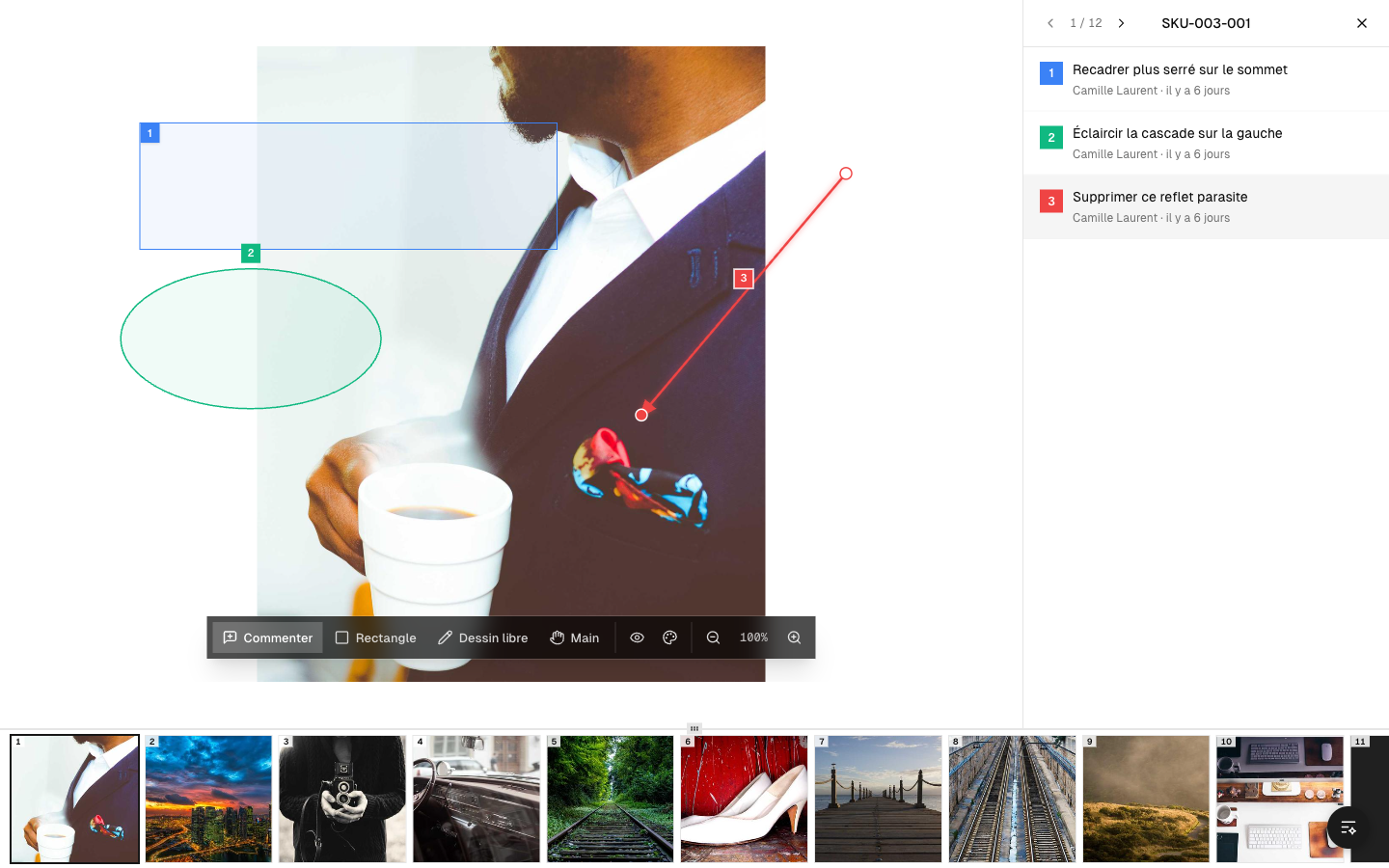 The annotation tools
Numbered markers and colors
Each annotation is numbered and has a color, which makes it easy to tie a comment to its mark on the image. Clicking a marker highlights the matching comment, and the other way around.
Comment threads
Comments are organized like a conversation: each annotation can receive replies. Every contributor's name is shown, so you know who wrote what.
Show / hide
A button lets you temporarily hide all the annotations to see the "clean" image again, then bring them back.
Who sees what
Annotations are shared among the people who have access to the project. They stay attached to the photo throughout the process: when it's time to work, the retoucher finds the notes left by the client.